Interview Brush-Up · Databases
5 reasons your database ignores the index you added
In one line: A function on the column, a leading wildcard, the wrong type, the wrong column order, or a query that wants most of the table.
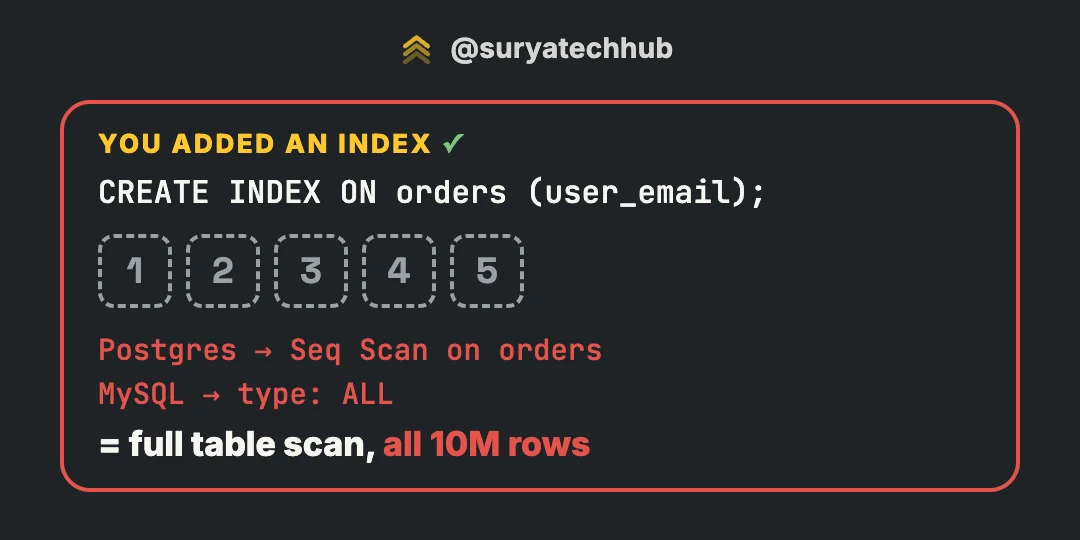
You add an index. The query is still slow, and EXPLAIN still says:
Postgres:  Seq Scan on orders
MySQL:     type: ALL   key: NULL
That’s a full table scan. The index exists, but the database didn’t use it.
A B-tree index is a sorted list of values, each with a pointer to its row. The database uses it by jumping to a point in that sorted list and reading forward. Every reason below is a case where your query doesn’t give it a point to jump to, or where jumping costs more than just reading the table.
All the examples use one orders table with 10 million rows:
| order_id (VARCHAR) | user_email | status | created_at |
|---|---|---|---|
| 100231 | Priya.N@Gmail.com |
delivered | 2026-09-02 10:12 |
| 100234 | Surya@X.com |
delivered | 2026-10-30 09:14 |
| 100240 | arjun@gmail.com |
payment_failed | 2026-10-05 18:40 |
1. A function on the column
CREATE INDEX ON orders (user_email);

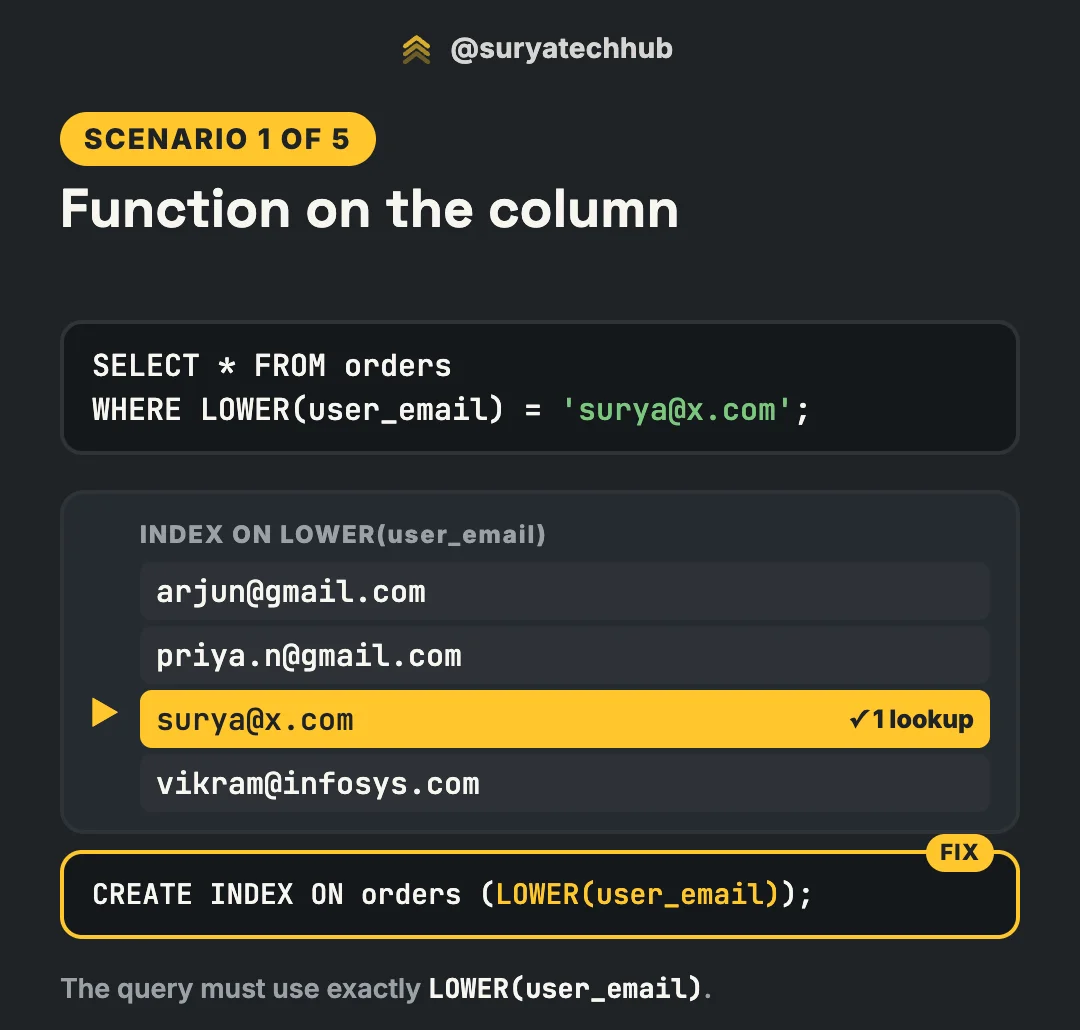
SELECT * FROM orders WHERE LOWER(user_email) = 'surya@x.com';
The index stores emails exactly as they were saved: Surya@X.com. The value surya@x.com isn’t in it. To compare, the database has to run LOWER() on every row first, and that’s a full scan.
The fix is to index the same expression the query uses:
-- Postgres
CREATE INDEX ON orders (LOWER(user_email));

-- MySQL 8.0.13+ (note the double parentheses)
CREATE INDEX idx_email_lower ON orders ((LOWER(user_email)));
The query must use exactly that expression. LOWER(user_email) matches; UPPER(user_email) or LOWER(TRIM(user_email)) doesn’t.
Two related points:
- In MySQL you often don’t need
LOWER()at all. The default collation (utf8mb4_0900_ai_ci) is case-insensitive, soWHERE user_email = 'surya@x.com'already matchesSurya@X.comand uses the plain index. AddingLOWER()“to be safe” is what breaks it. - In Postgres, the other option is the
citexttype, or normalising emails to lowercase when you write them.
Same with dates
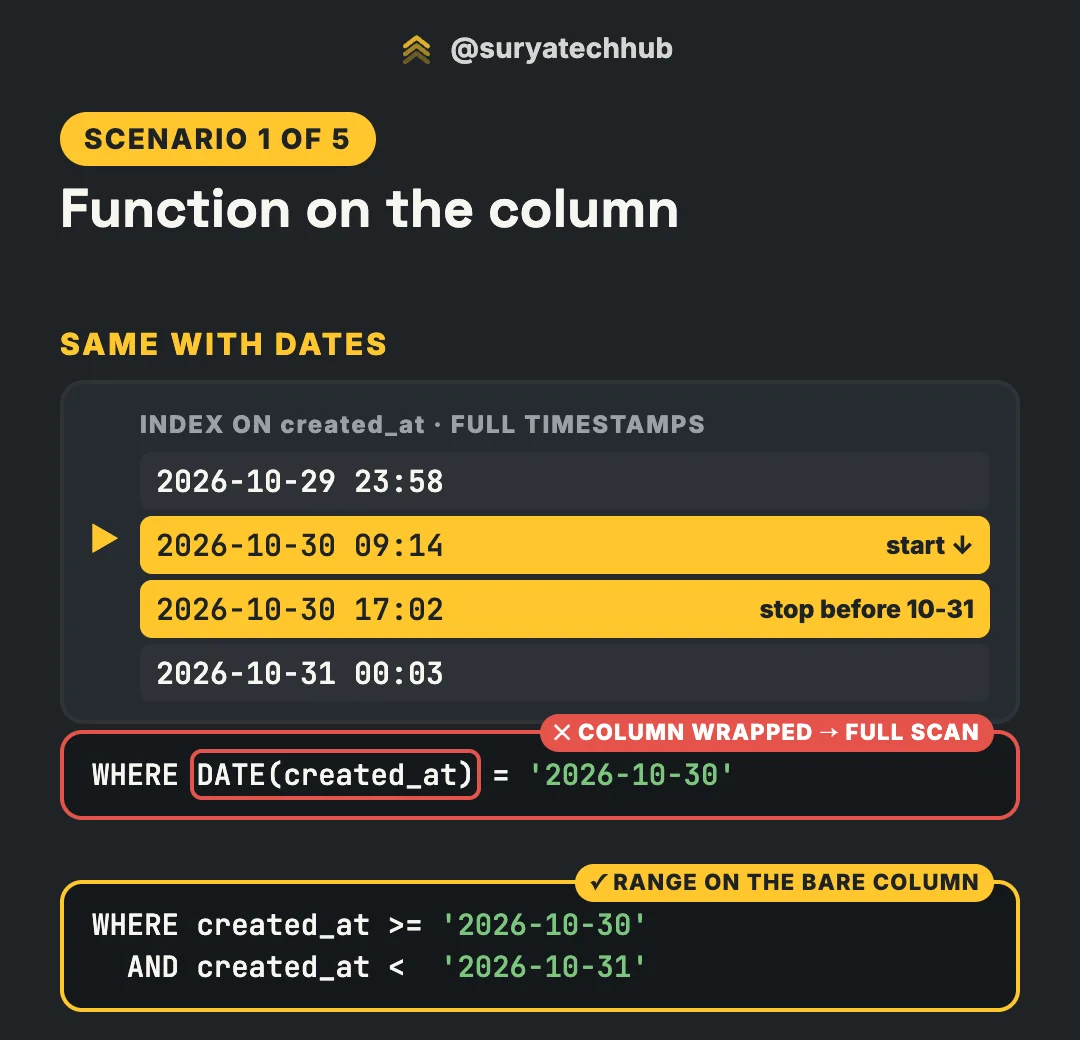
-- ✕ the column is wrapped in a function
WHERE DATE(created_at) = '2026-10-30'

-- ✓ a range on the bare column
WHERE created_at >= '2026-10-30'
  AND created_at <  '2026-10-31'
The index on created_at holds full timestamps (2026-10-30 09:14). With DATE() around the column, the database must convert every row. With a range, it jumps to the first timestamp of the day and reads forward until it reaches the next day.
Use >= and < the next day, not BETWEEN '2026-10-30' AND '2026-10-30 23:59:59', which misses the last second and anything with fractions of a second. With timestamptz, the day boundary follows the session’s time zone, so check what “a day” means for your users.
The general rule: keep the column bare and put the work on the value side. The same applies to WHERE created_at + INTERVAL '1 day' > now() (write created_at > now() - INTERVAL '1 day') and to arithmetic like WHERE price * 1.18 > 1000.
2. A wildcard at the start
SELECT * FROM orders WHERE user_email LIKE '%@gmail.com';The index is sorted from the first character. “Ends with @gmail.com” is like looking up everyone whose name ends in “kumar” in a phone book: the matches are scattered across every page, so you read every page.
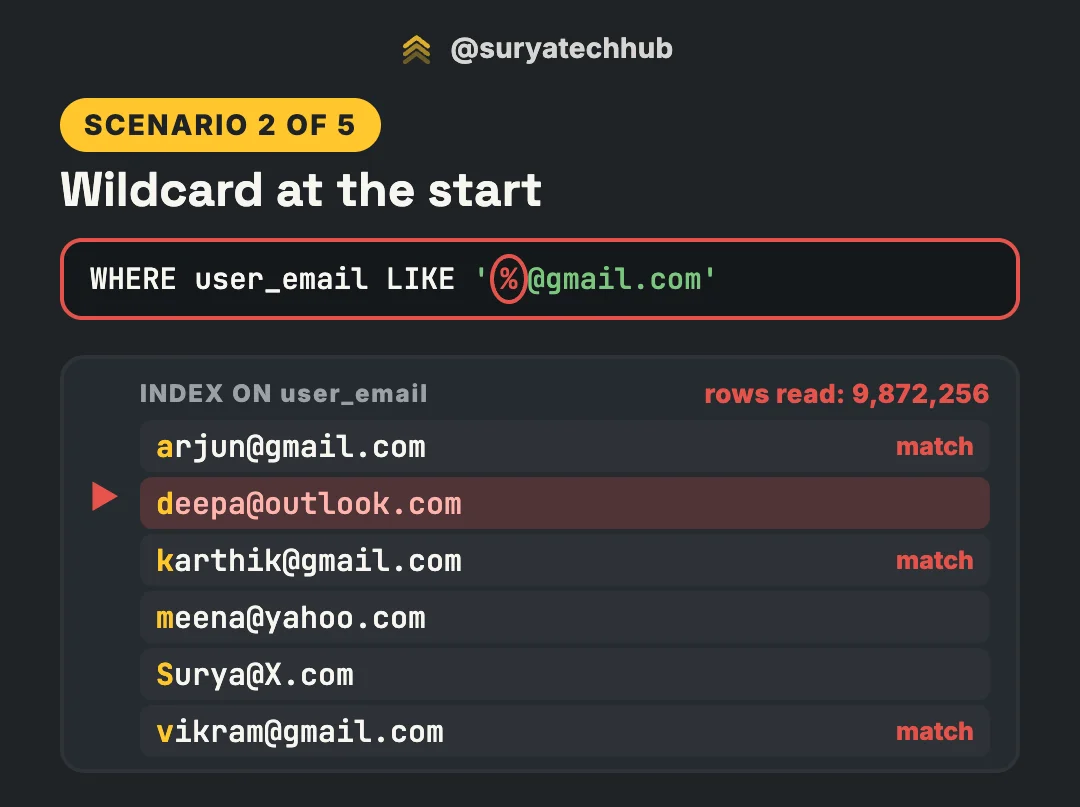
Starts-with works, because all the matches sit together in the sorted list:
WHERE user_email LIKE 'karthik%' -- a range: from 'karthik' up to the next prefixOne catch in Postgres: a normal B-tree supports LIKE 'abc%' only if the column uses the C collation, or the index is built with a pattern operator class:
CREATE INDEX ON orders (user_email text_pattern_ops); -- varchar_pattern_ops for varcharMySQL uses a plain index for LIKE 'abc%' with no extra setup.
For ends-with or contains, you need a different kind of index. In Postgres, that’s a trigram index. Every value is split into 3-character pieces, and the index stores each piece with the rows that contain it:
CREATE EXTENSION IF NOT EXISTS pg_trgm;
CREATE INDEX ON orders USING gin (user_email gin_trgm_ops);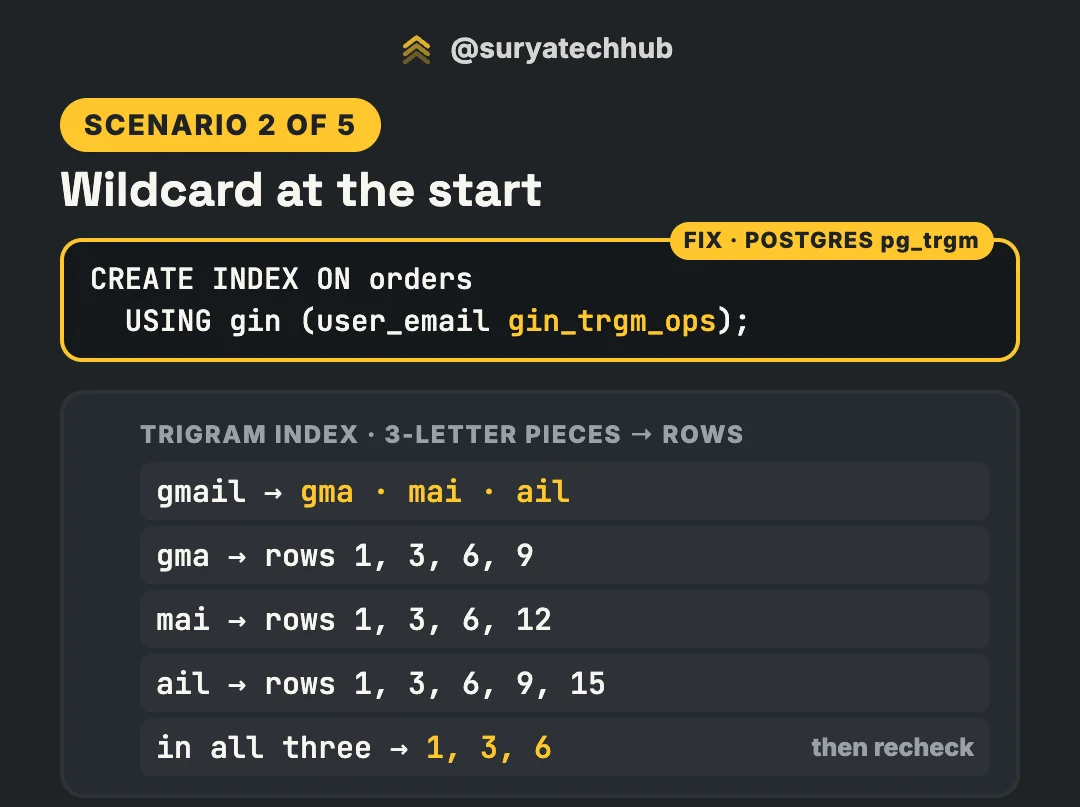
For LIKE '%gmail%', Postgres looks up the pieces of the pattern, keeps the rows that appear for all of them, then rechecks those rows against the real pattern. It also works for ILIKE and regular expressions. The trade-offs: it’s bigger than a B-tree, it slows down writes, and patterns shorter than 3 characters can’t use it well.
MySQL has nothing like it for LIKE. And for this exact query, the cleaner design in either database is to stop searching inside the string. Store the domain in its own column and index that:
-- MySQL
ALTER TABLE orders
  ADD COLUMN email_domain VARCHAR(255)
    AS (SUBSTRING_INDEX(user_email, '@', -1)) STORED,
  ADD INDEX (email_domain);

SELECT * FROM orders WHERE email_domain = 'gmail.com';
3. The wrong type
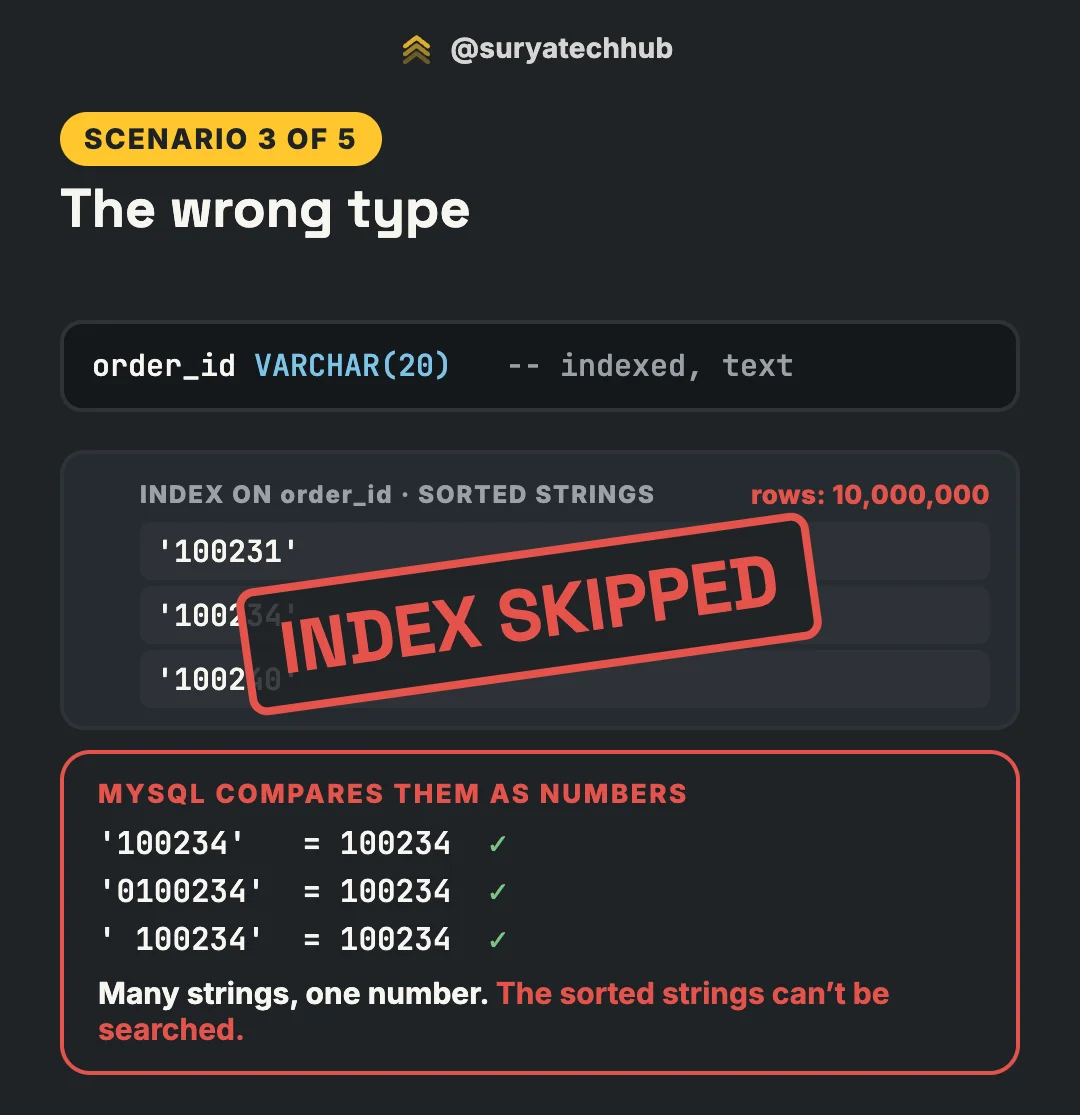
order_id is a text column, which is common in real systems: IDs that came from another system, or that have leading zeros. Your code sends a number:
order_id = request.json["order_id"]          # 100234: an int, not "100234"
db.execute("SELECT * FROM orders WHERE order_id = %s", (order_id,))
# → WHERE order_id = 100234     (no quotes)
In MySQL, comparing a string column with a number means both sides are compared as numbers. Many different strings convert to the same number:
'100234'   = 100234   ✓
'0100234'  = 100234   ✓
' 100234'  = 100234   ✓
So the sorted list of strings is no help. '0100234' and '100234' sit in different places in it, but both match. MySQL converts every row and scans the table. Its documentation says this directly: for a string column compared with a number, it cannot use an index to look up the value.
The fix is to send the value as the column’s type:
db.execute("SELECT * FROM orders WHERE order_id = %s", (str(order_id),))What else to know:
- The other direction is fine. An integer column compared with a string constant (
WHERE id = '42') converts the constant once, and the index is used. - Postgres fails loudly instead of slowly.
varchar = integerraisesoperator does not exist: character varying = integer. But it has its own quiet version: anintegercolumn compared with anumericvalue (WHERE id = 42.0, or a driver sending a decimal) casts the column and can skip the index. - Joins have the same problem. Joining a
VARCHARkey to anINTkey, or two string columns with different character sets or collations, forces a conversion on one side, and that side’s index isn’t used.
4. The wrong column order
CREATE INDEX ON orders (user_email, created_at);

SELECT * FROM orders WHERE created_at > '2026-10-01';
A composite index is sorted by the first column, then by the second column within each value of the first. Like a phone book sorted by last name, then first name: finding everyone called “Arun”, whatever their last name, means reading the whole book.
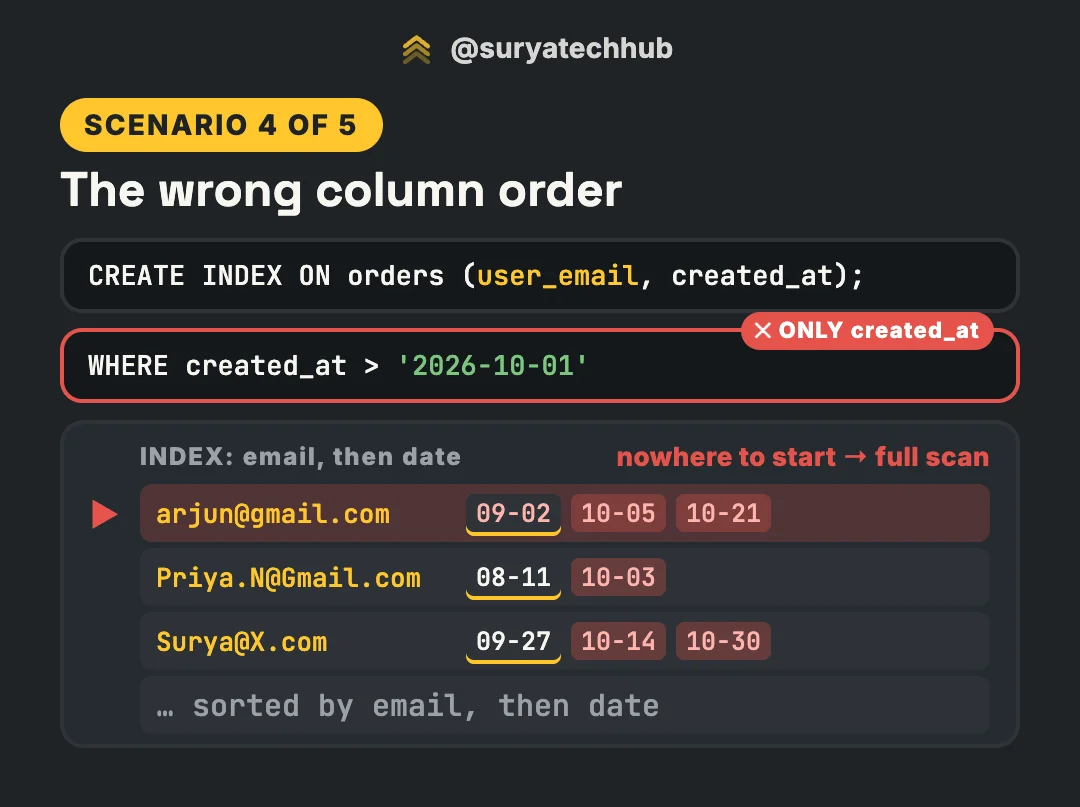
The October dates are spread across every user’s block, so there’s no single place to start. The index helps only when the query filters on a leftmost prefix of its columns: user_email, or user_email and created_at.
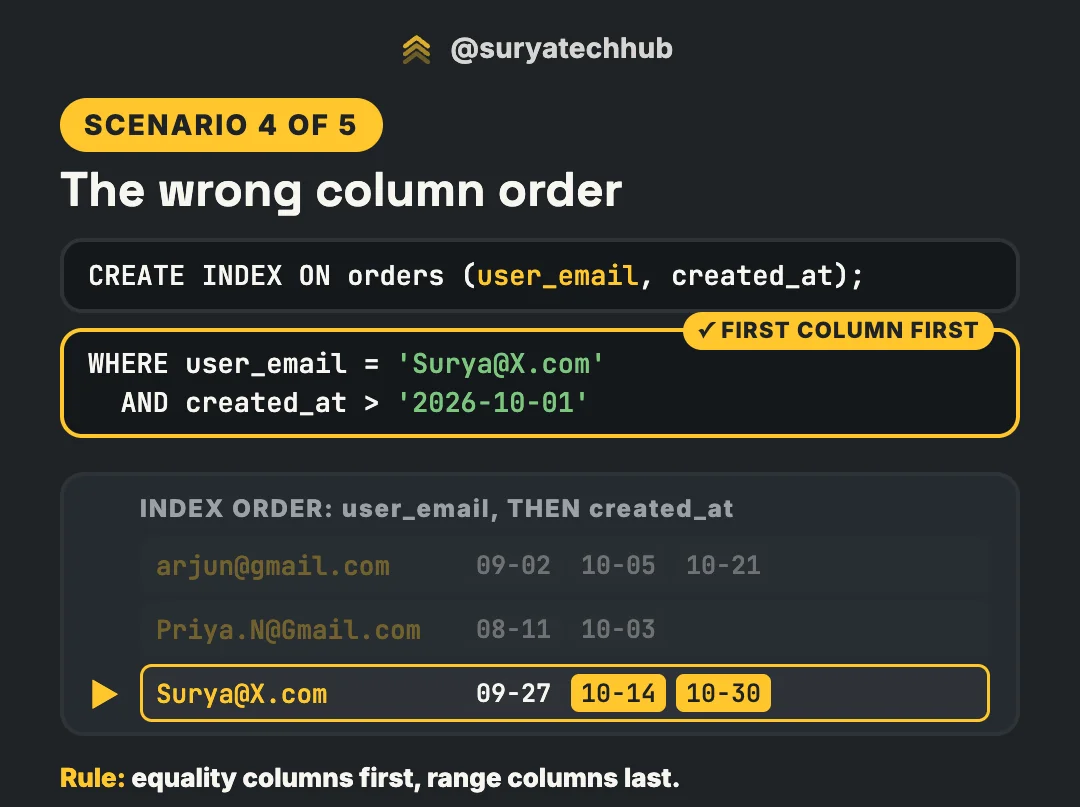
How to order the columns:
- Put the column you always filter on first.
- Equality columns first, range columns last. With
(user_email, created_at), the queryuser_email = ? AND created_at > ?jumps to one user and reads a single run of dates. Reverse the order and the same query reads every row in the date range, checking each email. - Need date-only queries too? Add a separate index on
(created_at). One index can’t serve both orders.
Skip scan (MySQL 8.0.13+, Postgres 18) can use the index without the first column by jumping through each distinct first value. It pays off only when the first column has few distinct values, like a status or country, not an email. Don’t design your indexes around it.
5. The query wants most of the table
CREATE INDEX ON orders (status);

SELECT * FROM orders WHERE status = 'delivered';
Here the index works fine, and the database chooses not to use it. 9 million of your 10 million orders are delivered.
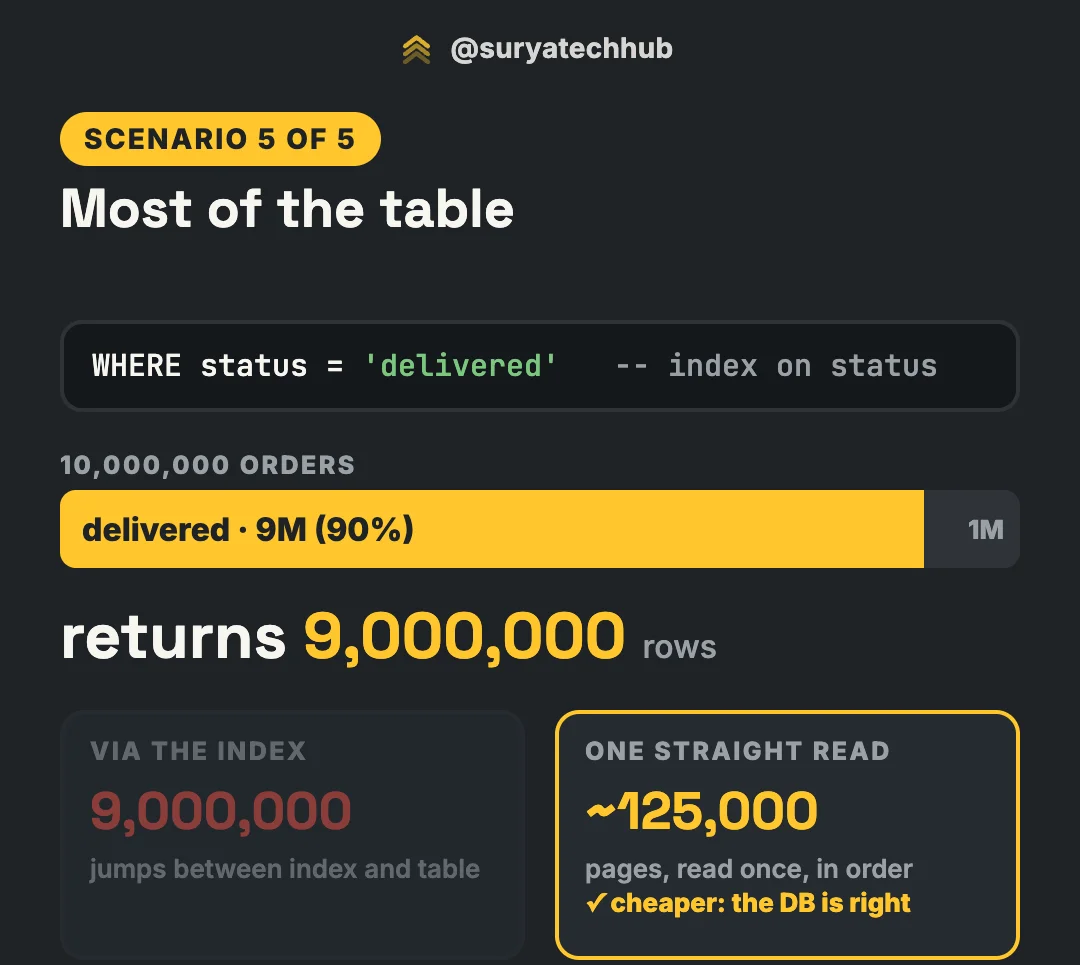
Using the index means jumping between the index and the table for each of 9 million rows, landing on table pages in random order and visiting many of them again and again. A sequential scan reads the table once, in order: with about 80 rows per 8 KB page, that’s roughly 125,000 pages. When a query returns a big share of the table, the full scan is cheaper, and the planner is right to choose it. There’s no fixed cut-off; the planner decides from its statistics, the table’s layout and its cost settings. In Postgres you’ll also see a middle option, a Bitmap Heap Scan, which collects the matching row locations first and then reads the table pages in order.
What to do instead:
-
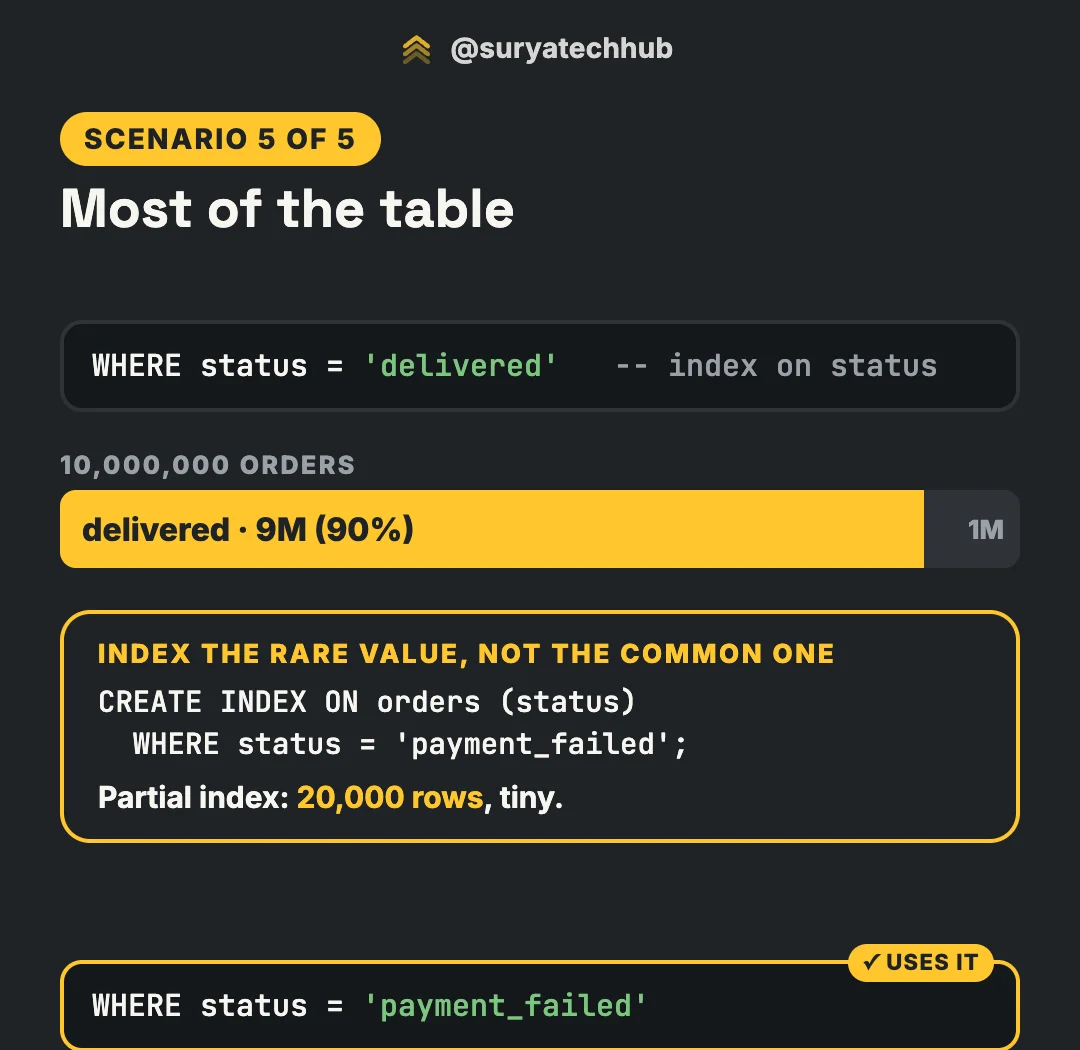
Don’t index the common value. Index the rare one. The interesting queries are usually about the few: failed payments, pending orders. In Postgres, a partial index holds only those rows, so it stays tiny:
CREATE INDEX ON orders (created_at) WHERE status = 'payment_failed';

SELECT * FROM orders
WHERE status = 'payment_failed' AND created_at > now() - INTERVAL '1 day';
The planner uses it only when the query’s
WHEREmatches the index condition. MySQL has no partial indexes, but a plain index onstatusstill gets used for the rare value, because the optimizer estimates how many rows each value matches. -
A covering index changes the maths. If the index holds every column the query needs, Postgres can answer from the index alone (an Index Only Scan) and MySQL shows
Using index. No jumps to the table, so it can win even for large result sets.
Before you add another index
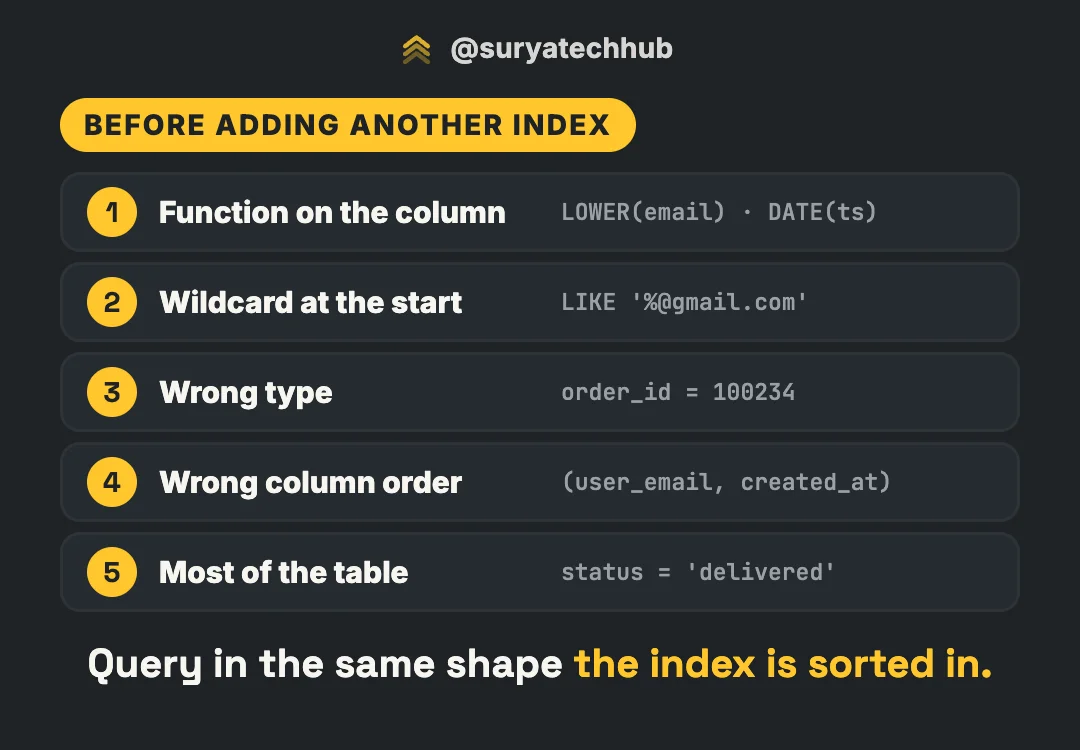
When EXPLAIN shows a full scan, check these five before you add an index:
- ✅ Function on the column? Index the expression, or move the work to the value side (date ranges).
- ✅ Wildcard at the start? Starts-with is fine. For ends-with or contains, use a trigram index, or store the part you search in its own column.
- ✅ Wrong type? Send values as the column’s type. Check joins for type and collation mismatches.
- ✅ Wrong column order? Is the query filtering on a leftmost prefix? Equality columns first, range columns last.
- ✅ Most of the table? Then the scan is correct. Index the rare value (partial index) or cover the query.
Also check that the planner’s statistics are current. After a big import or delete, the row estimates can be badly off. Run ANALYZE orders; in Postgres, or ANALYZE TABLE orders; in MySQL. Then read the plan with real numbers: EXPLAIN (ANALYZE, BUFFERS) in Postgres, EXPLAIN ANALYZE in MySQL 8.0.18+.
The thumb rule behind all five: query in the same shape the index is sorted in.